Advanced Use Cases
SQL Example 1: Revenue Generation Analysis by Customer Fit Score
This example demonstrates how to report revenue generation for a specific stage
in your sales funnel. It illustrates segmentation using a custom property from
your CRM's Companies table. The example focuses on analyzing the NewBiz stage,
segmenting by the customer_fit_score property.
The goal is to showcase how to leverage Dreamdata's data warehouse solution to address business questions using custom CRM properties.
In this scenario, understanding that the customer_fit_score is a custom
attribute previously defined in the CRM and synced to the data warehouse is
crucial. While your CRM may include other custom properties, this approach
provides a flexible model for similar data analyses.
For further guidance on enabling custom properties in the data warehouse, please refer to the Custom Properties documentation.
-- BigQuery SQL example
-- SQL query to analyze revenue generation by customer fit score in NewBiz stage
WITH company_scores AS (
    -- -- Extract Customer Fit Score
    -- -- This is a hypothetical example, the customer_fit_score may not be a real property in your CRM
    SELECT
        dd_company_id,
        JSON_VALUE(custom_properties.customer_fit_score) AS customer_fit_score
    FROM
        companies_table
    WHERE
        JSON_VALUE(custom_properties.customer_fit_score) IS NOT NULL
),
newbiz_revenue AS (
    -- -- Filter NewBiz Stage Revenue
    SELECT
        s.dd_company_id,
        s.value
    FROM
        stages_table AS s
    WHERE
        s.timestamp >= '2024-12-01'
        AND s.timestamp < '2025-01-01'
        AND s.stage_name = 'NewBiz'
)
-- -- Aggregate Revenue
SELECT
    cs.customer_fit_score,
    ROUND(SUM(nr.value), 2) AS total_revenue,
    ROUND(AVG(nr.value), 2) AS avg_revenue
FROM
    newbiz_revenue AS nr
JOIN
    company_scores AS cs ON nr.dd_company_id = cs.dd_company_id
GROUP BY
    cs.customer_fit_score
ORDER BY
    cs.customer_fit_score ASC
Explanation
-
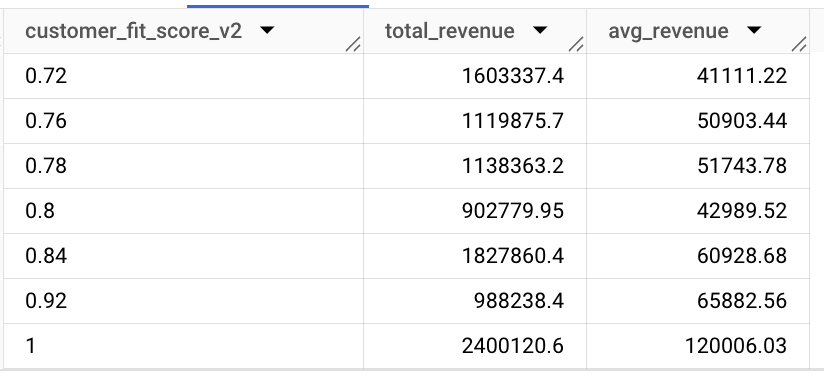
Purpose: The query calculates total and average revenue generated for the 'NewBiz' stage in 2024, segmented by the
customer_fit_scorecustom property. -
Steps:
- Extract Customer Fit Score: The common table expression (CTE)
company_scoresextractscustomer_fit_scorefrom the JSON in the Companies table using theJSON_VALUEfunction. - Filter NewBiz Stage Revenue: Another CTE
newbiz_revenuefilters the Stages table for records wherestage_nameis 'NewBiz' within the specified timestamp range. - Aggregate Revenue: The final query joins these CTEs, groups by
customer_fit_score, and calculates both total and average revenue for each segment.
- Extract Customer Fit Score: The common table expression (CTE)
-
JSON_VALUE Function: The
custom_propertiescolumn is a JSON column format, and theJSON_VALUEfunction is used to extract thecustomer_fit_scorefrom the JSON column. This function is specific to BigQuery, but similar methods exist in other data warehouses, allowing users to extract and analyze JSON data effectively.
Output
The output will be a table similar to the following:
SQL Example 2: Deals by Last Touch Channel
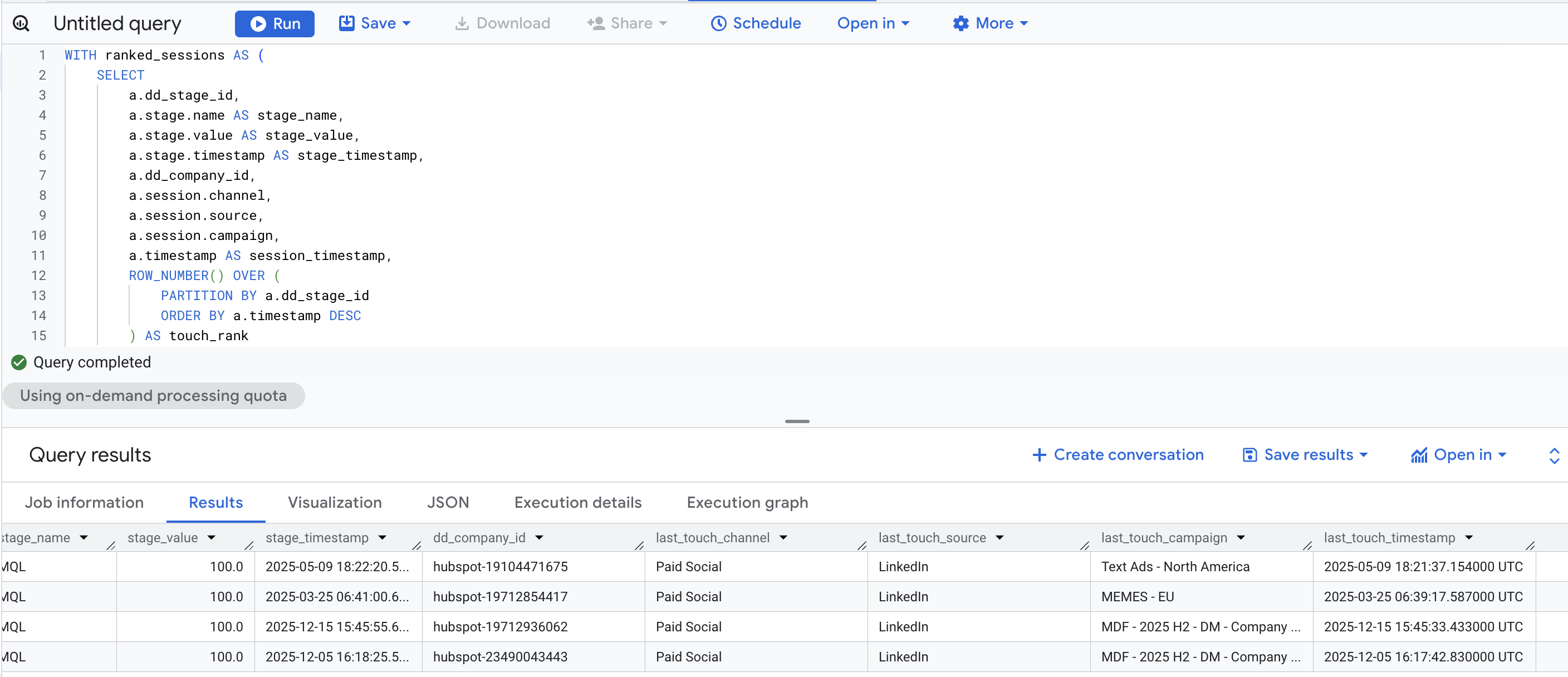
Find all deals (stages) in a given time period where the last touch before conversion was from a specific channel (e.g., LinkedIn Paid Social).
-- BigQuery SQL example
-- Find deals where the last touch was LinkedIn Paid Social
WITH ranked_sessions AS (
    SELECT
        a.dd_stage_id,
        a.stage.name AS stage_name,
        a.stage.value AS stage_value,
        a.stage.timestamp AS stage_timestamp,
        a.dd_company_id,
        a.session.channel,
        a.session.source,
        a.session.campaign,
        a.timestamp AS session_timestamp,
        ROW_NUMBER() OVER (
            PARTITION BY a.dd_stage_id
            ORDER BY a.timestamp DESC
        ) AS touch_rank
    FROM
        attribution_table AS a
    WHERE
        a.stage.name = 'MQL'              -- Target stage (e.g., Closed-Won, NewBiz, MQL)
        AND a.stage.timestamp >= '2025-01-01'   -- Stage reached after this date
        AND a.stage.timestamp < '2026-01-01'    -- Stage reached before this date
)
SELECT
    dd_stage_id,
    stage_name,
    stage_value,
    stage_timestamp,
    dd_company_id,
    channel AS last_touch_channel,
    source AS last_touch_source,
    campaign AS last_touch_campaign,
    session_timestamp AS last_touch_timestamp
FROM ranked_sessions
WHERE
    touch_rank = 1                               -- Only the last touch
    AND channel = 'Paid Social'                  -- Filter by channel
    AND source = 'LinkedIn'                      -- Filter by source
The output will be a table similar to the following:
Explanation
-
Purpose: The query identifies all deals (stages) reached within a specific time period where the last touch before stage was reached came from a particular channel, such as LinkedIn Paid Social.
-
Steps:
- Rank Sessions by Recency: The CTE
ranked_sessionsuses theROW_NUMBER()window function to rank all sessions within each stage journey by timestamp in descending order. The most recent session (last touch) getstouch_rank = 1. - Filter by Stage and Time Period: The query filters for a specific stage
(e.g., 'MQL') and a date range based on when the stage was reached
(
stage.timestamp). - Select Last Touch: The final query filters for
touch_rank = 1to get only the last touch, then further filters by channel and source.
- Rank Sessions by Recency: The CTE
-
Customization:
- Replace
attribution_tablewith your actual table name - Adjust
stage.nameto your target stage (e.g., 'MQL', 'SQL', 'NewBiz') - Modify
channelandsourcefilters based on your data (e.g., 'Organic Search', 'Direct', 'Paid Search') - Remove the channel/source filters to see all deals with their last touch information
- Replace